

If you’re on YouTube, you already know this uncomfortable truth:
It doesn’t matter how good your video is…
If nobody clicks it.
That’s the brutal reality. You can spend 10 hours scripting, filming, editing, optimizing audio, and polishing transitions. But if your thumbnail doesn’t grab attention in under a second, your masterpiece sits there unnoticed.
So in this Clickly Review, we’re going to answer one simple question:
Is Clickly actually worth it, or is it just another AI tool riding the hype wave?
I’ve analyzed how it works, who it’s for, what it does well, where it falls short, and whether it can realistically improve your YouTube performance.
Let’s break it down properly.
What Is Clickly?
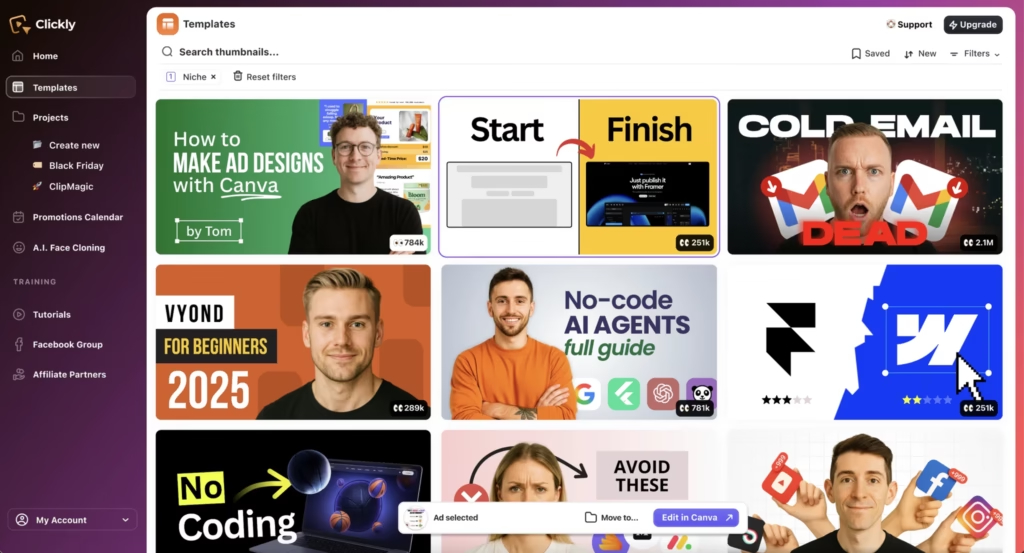
Clickly is an AI-powered YouTube thumbnail creation platform.
In simple terms, it helps you generate click-worthy thumbnails in under a minute using:
- AI thumbnail generation
- Proven high-performing template patterns
- AI face and expression cloning
- Canva integration
Instead of staring at a blank design canvas and guessing what might work, Clickly gives you ready-made thumbnail concepts modeled after real YouTube videos that achieved strong engagement.
Here’s what most people don’t know:
Clickly isn’t just a design tool. It’s a behavior tool.
It’s built around one idea — improving your click-through rate (CTR).
Why Thumbnails Matter More Than You Think
Before we dive deeper into this Clickly review, let’s talk strategy.
YouTube growth isn’t just about content quality. It’s about this sequence:
- Impression
- Click
- Watch time
- Engagement
- Algorithm push
If step 2 fails, nothing else matters.
The biggest mistake people make is assuming good content automatically gets discovered. It doesn’t. YouTube rewards engagement signals. And engagement starts with the click.
That’s the problem Clickly tries to solve.
How Clickly Works (Step by Step)
Let me explain how the platform actually functions.
Step 1: Paste Your YouTube Link
You drop your video URL into Clickly.
The AI analyzes your content topic and context.
Step 2: AI Generates Thumbnail Concepts
Within seconds, you get multiple thumbnail layouts inspired by proven patterns.
Not random templates.
Not generic stock designs.
Patterns modeled after videos with real traction.
Step 3: Choose From the Winning Template Library
Clickly includes over 2,000+ thumbnail templates, each with 3–4 variations for testing.
You can filter by:
- Emotion
- Style
- Layout
- Niche
Step 4: AI Face Cloning (Optional)
Upload a single face photo.
Generate multiple expressions instantly.
This is surprisingly powerful if you:
- Hate taking new photos
- Run a faceless channel
- Don’t want constant photoshoots
Step 5: Export to Canva
Everything exports directly to Canva. You tweak text, adjust colors, and download.
Total time?
Often under two minutes.
Core Features Breakdown
Let’s go deeper into the feature set in this Clickly review.
1. AI Thumbnail Generator
The core engine.
Paste link → get concepts.
This removes decision fatigue. And honestly, decision fatigue is the real enemy of consistency.
2. Proven Template Library
2,000+ templates modeled after high-performing thumbnails.
To be honest, this is where Clickly gets interesting.
You’re not designing based on taste. You’re designing based on patterns that already worked.
3. AI Face & Expression Cloning
Upload one image.
Generate multiple emotional variations.
Think surprise, shock, curiosity, confidence.
If you’ve ever reused the same headshot 20 times, you know how valuable this can be.
4. Canva Integration
No Photoshop.
No complicated design software.
Works with free Canva.
This keeps things practical, not technical.
Who Is Clickly Actually For?
Let’s be realistic.
Clickly is best for:
- YouTubers who upload consistently
- Affiliate marketers
- Coaches and educators
- Agencies managing multiple channels
- Faceless channel operators
If YouTube is part of your income strategy, this tool makes more sense.
If YouTube is just a hobby you upload to twice a year, you probably don’t need it.
Who Should Probably Skip It?
Let’s keep this balanced.
Clickly may not be for:
- Professional designers who prefer full creative control
- Big brands with in-house design teams
- People expecting instant viral success
No AI tool guarantees views.
And any review that tells you otherwise is misleading you.
Clickly Pricing – Is It Fair?
Clickly is a one-time payment (lifetime access).
No subscription.
No recurring monthly fees.
That’s refreshing in a SaaS-heavy world.
Compared to:
- $15–$50/month design tools
- $10–$20 per thumbnail freelancers
Clickly can pay for itself quickly if you upload consistently.
There’s also a 30-day money-back guarantee.
So risk is minimal.
Real Advantages of Clickly
Here’s what I genuinely like:
✔ Extremely fast workflow
✔ Removes blank canvas anxiety
✔ Based on performance patterns
✔ Works with free tools
✔ Affordable lifetime pricing
✔ Great for non-designers
It simplifies something that usually eats time.
Real Limitations
Let’s not ignore this part.
✖ It won’t fix bad content
✖ It won’t write better titles
✖ It won’t understand your audience automatically
✖ AI faces can look repetitive if overused
Clickly optimizes attention.
It doesn’t replace strategy.
Can Clickly Actually Improve CTR?
Now we’re getting to the real question.
Can Clickly improve click-through rate?
Short answer: It can improve your odds.
Here’s why:
- It uses proven visual triggers
- It encourages testing variations
- It speeds up iteration
- It reduces inconsistent design
And YouTube rewards consistency.
If your thumbnails become:
- More emotionally expressive
- More contrast-driven
- More curiosity-based
Your CTR can improve.
But again — content still matters.
Clickly vs Canva vs Designers
| Feature | Clickly | Canva | Freelancer |
|---|---|---|---|
| AI Concepts | ✔ | ✖ | ✖ |
| Proven Templates | ✔ | Limited | Depends |
| Speed | Very Fast | Medium | Slow |
| Cost | One-time | Monthly | Ongoing |
| Skill Required | Low | Medium | None |
Clickly sits between DIY and outsourcing.
That’s its sweet spot.
My Honest Verdict
To be honest, Clickly is not revolutionary technology.
But it is a smart workflow tool.
It removes friction.
It removes overthinking.
It reduces wasted time.
And that’s where its value lies.
The biggest mistake people make is waiting until they’re “big enough” to optimize thumbnails.
Optimization should happen early.
If you’re serious about YouTube growth, Clickly can help streamline your process.
If you’re casual, you may not need it.
Final Answer: Is Clickly Worth It?
If YouTube is part of your growth plan — yes.
If you want:
- Faster thumbnails
- Better consistency
- Less design stress
- More testing ability
Then Clickly is worth considering.
If you expect AI to replace creativity or guarantee views, it’s not.
Clickly doesn’t create success.
It improves presentation.
And on YouTube, presentation is often the difference between:
100 views
and
100,000 views.
That’s the reality.
If you’ve read this entire Clickly review, you already understand something most creators overlook:
Attention comes first.
Everything else comes after.